Why Client-Side Tracking Is Dying in 2026 and What You Can Do About It (For Framer)
The tracking data you are seeing is not accurate.
For years, digital marketing ran on client-side tracking. You paste a JavaScript snippet into your site header, and when someone visits your page or clicks a button, the script sends that data directly from their browser to Google or Meta. It is simple to set up, and for a long time, it worked well enough.
But the environment it was built for no longer exists.
In 2026, three major forces are systematically breaking client-side tracking. This post explains what those forces are, how much data you are likely losing, and what you can do about it on a Framer site without needing a developer.
What Client-Side Tracking Actually Does
Client-side tracking works by loading JavaScript in the user's browser. The Meta Pixel, the GA4 tag, the TikTok Pixel: all of these are scripts that run on the user's device and report events directly to the ad platform.
The flow looks like this:
User visits your site -> JavaScript loads in their browser -> Script sends event data to Google or Meta
This approach became the standard because it is fast to implement and requires no infrastructure on your end. The ad platforms host the scripts. You just paste a code snippet.
The problem is that this approach depends entirely on the user's browser. And browsers, in 2026, are no longer a reliable conduit for this data.
Why Client-Side Tracking Is Failing in 2026
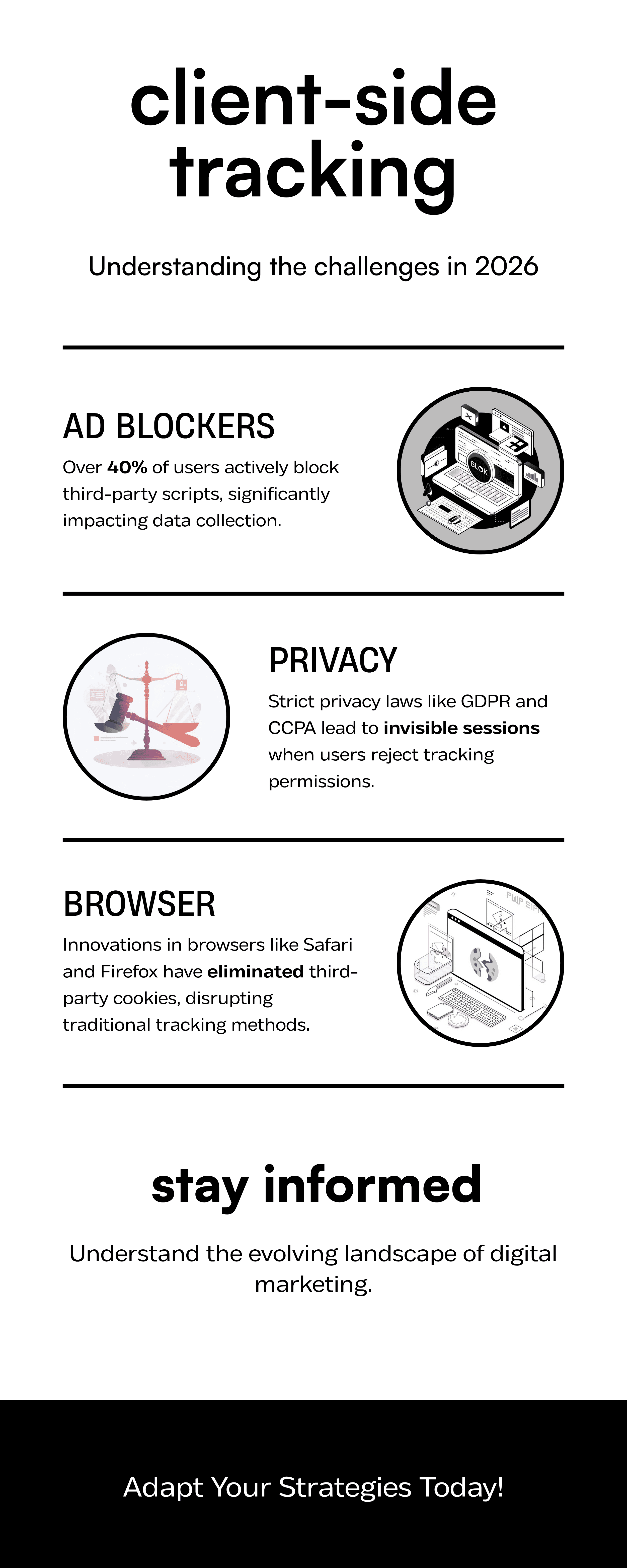
Three distinct forces are eroding client-side tracking simultaneously. Understanding each one helps you see why the problem is structural, not something you can patch with a better script.
Ad Blockers Are Now the Norm
Ad blocking has gone from a technical curiosity to a mainstream default. More than 40% of internet users now run some form of ad blocking software, whether that is a browser extension like uBlock Origin, a privacy-focused browser like Brave, or network-level blocking on mobile devices.
Most ad blockers maintain block lists that specifically target tracking scripts from Meta, Google, TikTok, and other platforms. When a user with an ad blocker visits your Framer site, those scripts never load. The event never fires. The conversion never gets recorded.
You lose that user's data entirely, and you have no way of knowing it happened.
Privacy Laws Have Changed What Is Legally Possible
GDPR, CCPA, and similar regulations across Europe, California, and other jurisdictions now require websites to get explicit consent before tracking users. This has led to the consent banner that now appears on almost every site you visit.
When a user clicks Reject or ignores the banner entirely, your client-side tracking scripts are legally prohibited from firing. That session goes unrecorded.
The percentage of users who reject tracking varies by region, but in Europe it is often between 30% and 60% of visitors. If a significant portion of your audience is European, you may be losing the majority of your data from that segment.
Browser-Level Restrictions Are Getting Stricter
Apple's Intelligent Tracking Prevention (ITP), which runs in Safari and WebKit-based browsers, aggressively limits the lifespan of cookies and local storage. A tracking cookie that used to persist for 30 days may now expire in 24 hours or less. Cross-site tracking is blocked by default.
Firefox has implemented similar restrictions. Chrome, which has historically been more permissive, is moving in the same direction under pressure from regulators and its own Privacy Sandbox initiative.
The result is that even when a client-side script does fire, it may not have the data it needs to attribute the conversion correctly. Users who visit your site on different occasions appear as strangers. Conversion paths break. Attribution becomes guesswork.
What This Means for Your Advertising
Take these three forces together and the picture becomes clear. Your client-side tracking is systematically undercounting conversions. The users you are losing data on are real users who took real actions. Your cost-per-conversion in Meta or Google Ads looks higher than it actually is because the denominator (conversions recorded) is smaller than the denominator (conversions that actually happened).
When Meta or Google's algorithm optimises your campaigns, it does so based on the conversion data it receives. If that data is incomplete, the algorithm optimises toward an incomplete picture of your actual customer. Ad performance suffers, and it is difficult to diagnose because the dashboards do not show you what is missing.
What Server-Side Tracking Does Differently
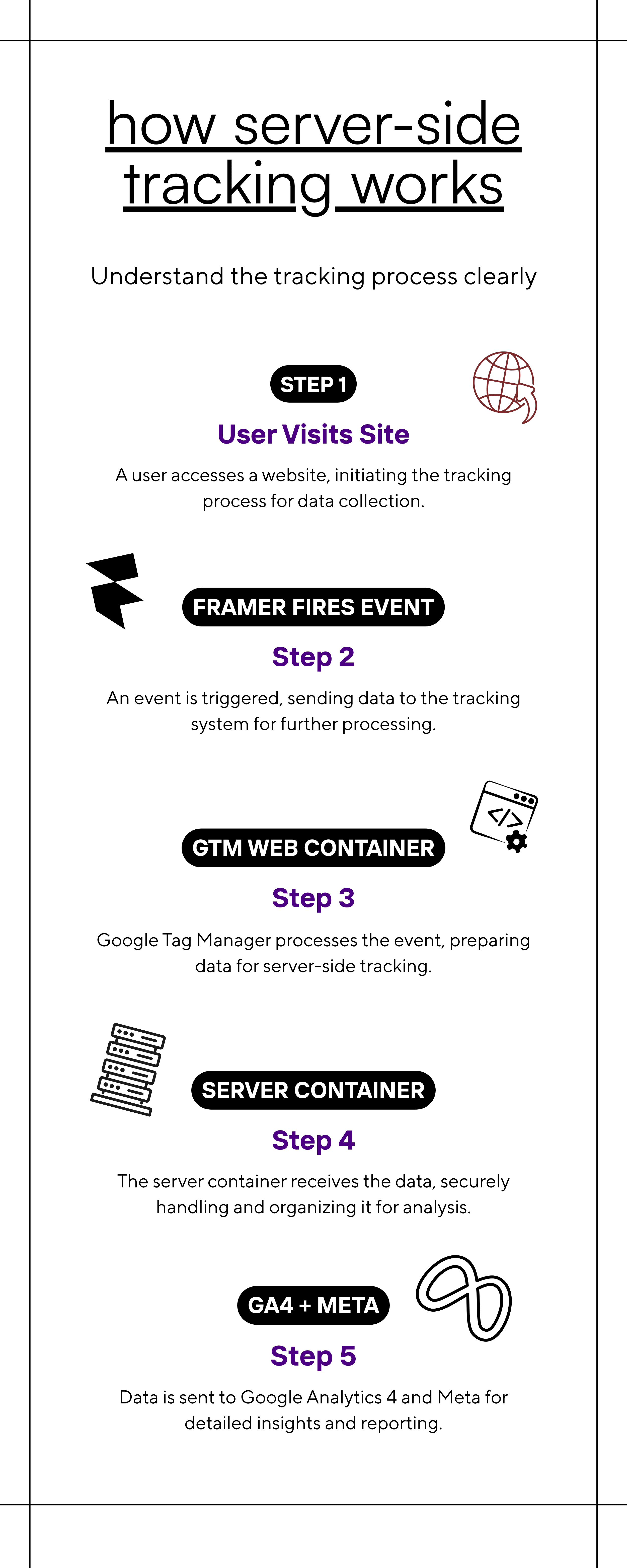
Server-side tracking removes the browser from the data collection equation. Instead of relying on JavaScript running in the user's browser to report events, you collect event data on your own server and forward it to GA4, Meta, or whichever platform you are using.
The flow looks like this:
User visits your Framer site -> GTM Web Container fires a small event -> Your GTM Server Container receives it -> Your server forwards it to GA4 and Meta
Because the data travels from your server to the platform's server, it is not affected by ad blockers. The user's browser never has to make a direct request to a third-party tracking domain. Your server handles the forwarding.
This approach also gives you much more control over the data. You decide exactly what information to include in each event. You can hash sensitive user data like email addresses before it leaves your server. You can filter out bot traffic, test events, or internal team sessions before they ever reach your analytics.
Is Server-Side Tracking Accurate?
It is significantly more accurate than client-side tracking in the current environment. Because events come from your server rather than from a blocked or restricted browser, you recover a substantial portion of the conversions that client-side tracking was missing.
When combined with Consent Mode v2 and a properly configured consent management platform like Cookiebot, you can also handle the privacy compliance side correctly. Users who reject tracking are handled appropriately, and users who accept tracking are tracked accurately.
Can You Set This Up on Framer Without a Developer?
Yes. This is one of the most common misconceptions about server-side tracking: that it requires backend development expertise.
Tools like Google Tag Manager Server-Side and Stape.io have made it possible to deploy a full server-side tracking stack without writing any backend code. If your site is on Framer, the implementation uses GTM's visual interface and Stape's managed hosting. No terminal, no cloud configuration, no custom API code.
The rest of this series walks through every step: setting up GTM on Framer, deploying a server container with Stape, routing GA4 through your server, configuring Consent Mode v2, setting up Meta Conversions API, and testing the full pipeline.
The Alternative: A Pre-Built Setup
If you would rather not build this from scratch, Framework CAPI is a pre-configured GTM setup designed specifically for Framer sites.
Framework CAPI is a ready-to-install GTM setup built specifically for Framer sites. The web container, server container, GA4 routing, Meta CAPI, and consent handling are all pre-configured. Import the container, update your variables, hit publish. The full tracking stack is live from day one.
Framework CAPI - Lead Gen Edition ->
A Note on Timeline
Client-side tracking is not going away overnight. It will remain useful for certain purposes. But the trajectory is clear: browsers are becoming more restrictive, privacy regulations are expanding, and the gap between what client-side tracking reports and what actually happened is widening.
The businesses that implement server-side tracking now will have a significant data quality advantage over those that wait. The setup described in this series takes a few hours to complete. The accuracy improvement lasts indefinitely.
Next in this series: Client-Side vs Server-Side Tracking in 2026 - What Marketers Need to Know ->
Category
Design
Publish at:
Read:
5 minutes